


vivago.ai - AI Image & Video
4.33.37K Reviews
App Specs
- Version
- 4.4.0
- Updated On
- License
- Free
- Downloads
- 50,000,000+
- Developer
- Sparking Innovations Limited
- Categories
- Video Players & Editors
- Platform
- Android
Screenshots

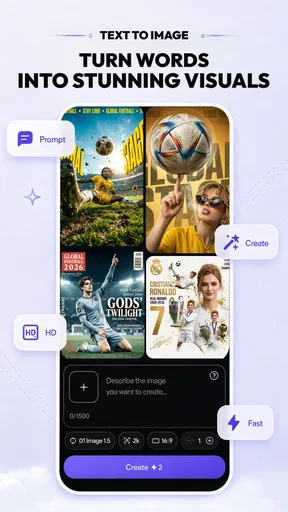
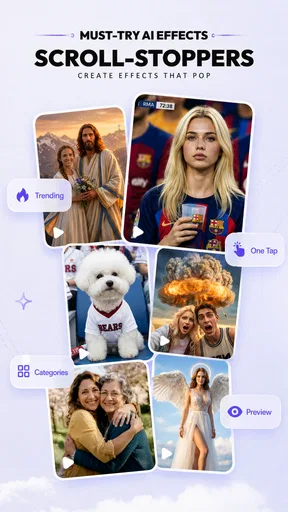
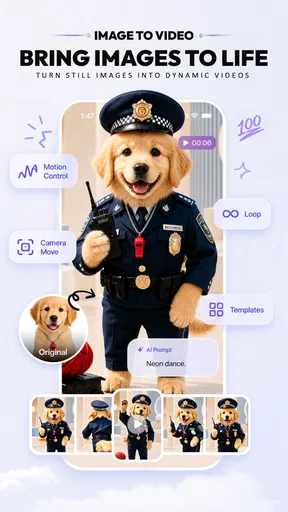
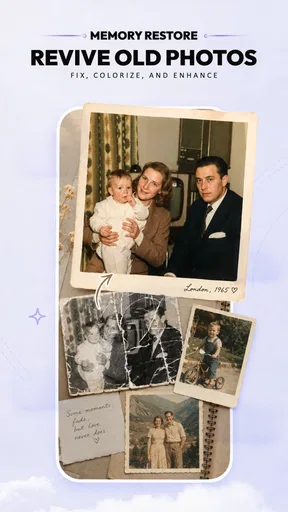
 Analysis by AppCompare
I think of vivago.ai-AI Video&Effects as a creative playground for people who want a striking clip without starting from a blank timeline. It is a video-editing app from Sparking Innovations Limited, and its appeal is the way AI effects sit alongside familiar editing tasks. That mix can make experimentation feel less intimidating, especially when I have a short idea in mind but not the time or patience for a full desktop workflow.
Making creative video feel more approachable
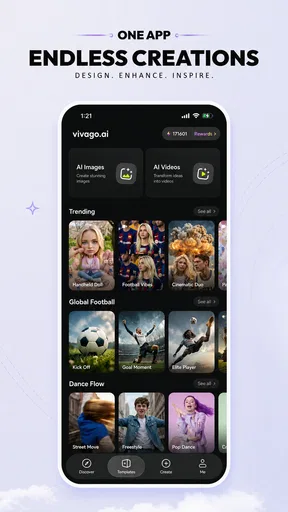
First things first, let's talk about getting started with vivago.ai. Downloading and setting up the app is a breeze. Once you open it, you're greeted with a sleek, user-friendly interface that makes you feel like a pro editor even if you're just starting out. The main screen is neatly organized, so you won't be overwhelmed by options.
Readability and navigation: a gentle start, with room to explore
The layout described in my experience suits quick, exploratory editing better than a traditional professional timeline. I can focus on the clip and the result rather than learning a dense set of controls first. That is useful when I am making a casual post or trying an effect for fun, but a tidy first screen is not the same as full guidance: anyone unfamiliar with editing may still need to test options to understand what each one changes.
For a more deliberate result, I would begin with one short clip and change one thing at a time. Try an effect, preview it, then decide whether a crop, speed adjustment, or lighting tweak helps. This keeps the creative process manageable and makes it easier to spot which edit is doing useful work. It also avoids piling on effects simply because they are available.
Exploring the Features
Now, let’s dive into the good stuff—AI effects. This app is packed with AI-powered tools that can transform your videos in seconds. Whether you want to add some dramatic effects or just tweak the lighting, you've got plenty of options. Here’s what caught my eye:
- AI Effects: These are the real game-changers. From turning your video into a sketch to adding magical sparkles, the possibilities are endless. The AI does a fantastic job detecting elements in your video and applying effects that look seamless.
- Editing Tools: Basic edits like trimming, cropping, and adjusting speed are super intuitive. What I love is how you can layer different effects and see changes in real-time.
- Music and Sound Effects: You can add background music or sound effects from a vast library. It’s like adding the perfect soundtrack to your mini-movie.
A useful way to approach the effect tools is to treat them as a finishing choice rather than a substitute for a good source clip. A clear subject and steady framing give an effect more to work with; a busy frame can make a dramatic treatment feel cluttered. I would also preview the effect against the whole clip, not just its opening moment, because movement and changing backgrounds can alter how consistent the result feels.
Motor and sensory considerations
For someone who prefers short interactions, the combination of basic edits and visible previews can make trying an idea feel more approachable than navigating a complex editing suite. The ability to see changes as I work is especially helpful when I want to judge an effect visually instead of relying on technical labels. At the same time, video editing naturally involves repeated choices and careful timing. Anyone who finds precise touch interactions tiring may prefer to keep projects short and make fewer, more considered adjustments.
Worth Reading Before You Choose

Baby Panda World Brings Quick Play to Modern Phones, but Its Game Library Feels Busy

ESPN’s Live Game View Makes Following Close Games Easier

QuizzLand Review: A Good Fit for Short Trivia Breaks, Not Every Player

Basketball Stars: Multiplayer Is Fast, but Can It Recover When Matches Go Wrong?

WEBTOON Turns Phone Updates Into a Better Reading Routine

Link to Windows Runs on Shared Habits, Not Social Feeds
Effects, motion, music, and sound can all contribute to a busy viewing experience. I would use restraint when making a clip for someone who is sensitive to intense visual changes or layered audio: choose a calmer treatment, keep the edit simple, and check the finished video before sharing it. Those choices are practical ways to make a creation more comfortable for its audience, even when the app itself is being used for expressive effects.
Performance and Usability
When it comes to performance, the app doesn’t disappoint. Videos render quickly, and even with multiple effects layered on top, the app runs smoothly without any hiccups. Plus, the AI’s ability to recognize and apply effects to specific parts of a video is quite impressive.
The app is designed for both casual users and more serious video editors. If you’re just dabbling, you’ll appreciate how easy it is to apply effects and share your creations. But if you’re looking for more control, the advanced settings let you tweak everything to your liking.
Situational access: where a phone-based workflow fits
I can see this working well in an everyday situation: after a walk, I have a few clips of a friend’s dog playing, and I want one playful version to send around. I can trim away the dull beginning, test a stylized effect, and add sound without first moving the footage to a computer. The app is most appealing when the goal is a compact, expressive video rather than a carefully managed long-form project.
That convenience has a trade-off. A phone is a natural place to capture and quickly edit a moment, but detailed decisions can feel cramped compared with a larger screen. If I were assembling a long sequence, matching many shots, or preparing a project that needs careful control over every edit, I would reach for a more timeline-focused editor. For a quick transformation or a social clip, though, the shorter path from footage to finished idea is the point.
It is also worth thinking about the viewing context before choosing an effect. A clip intended for a small phone screen can benefit from a clear subject and a simple visual treatment. If the video is meant to be reused in different settings, I would save a clean, lightly edited version of the source as well as the more stylized result when my workflow allows. Keeping those versions distinct makes it easier to adapt the idea later rather than having to rebuild it from the beginning.
Remaining barriers and practical trade-offs
AI effects are not automatically the right choice for every subject. When a clip has several moving elements or a complicated background, I would inspect the result carefully instead of assuming the effect will look equally convincing throughout. Previewing, trimming to the strongest moment, and simplifying the treatment are sensible ways to avoid letting an ambitious effect distract from what the video is actually about.
Another consideration is the cost model. The app is free to download, but it offers in-app purchases ranging from around a dollar to several hundred dollars per item. I would explore the free experience first and check the purchase details shown in the app before committing to anything. That is particularly useful if I only need an occasional effect rather than a regular creative tool.
It is rated for mature audiences aged 17 and up, so it is not a straightforward recommendation for younger creators or for families looking for an app with a child-oriented age classification. For adults, the practical question is whether its effects and editing approach match the kind of videos they actually make. Someone who primarily wants precise cuts, extensive audio control, or a conventional editing timeline may find a standard editor a better fit.
How it compares with familiar video editors
Compared with a typical editor built around arranging clips on a timeline, vivago.ai puts more of its appeal in AI-assisted visual treatments and quick experimentation. That makes it an interesting companion for a creator who wants to give a short clip a distinctive look without turning the task into a full editing session. A conventional editor is often the safer choice when the priority is exact sequencing and detailed control; this app makes more sense when the creative effect itself is the reason to edit.
I would not treat the two approaches as interchangeable. If I need a polished sequence with many cuts, careful audio balancing, and predictable control from beginning to end, I would use a tool designed for that kind of work. If I have a single moment that could be more fun as a sketch-like scene or a clip with a magical accent, the app’s effect-led workflow is more inviting. Choosing based on the job is more useful than expecting one mobile app to cover every editing need.
The app has a 4.5 average from around 72,000 ratings, and it has passed 10 million installs. Those figures suggest that it has found a broad audience, but they do not tell me whether its particular style fits an individual workflow. I would judge it by making a small test project: see whether the effect options feel worth exploring, whether the controls suit the way you work, and whether the result is something you would actually share.
Sharing Your Creations
Once you’ve crafted your masterpiece, sharing it is a piece of cake. The app integrates seamlessly with social media platforms, so you can post your video directly to Instagram, TikTok, or wherever your fans are waiting. There’s also an option to save your video in various formats and resolutions, which is super handy if you’re working on something for a specific platform.
Before posting, I would watch the saved result from start to finish and check that the crop, effect, and sound still work together. A preview while editing is useful, but the exported clip is what viewers will see. If a video is meant for a particular platform, it is worth considering its intended shape and audience before choosing the crop and the final look, rather than trying to fix every mismatch after the edit is complete.
Who will enjoy it, and who should look elsewhere
I would recommend this app to adults who like turning casual footage into something more expressive, especially people who want to experiment with visual effects without learning a complicated editing workflow first. It is also a reasonable choice for creators who already know what clip they want to make and need a quick way to try a few treatments. A simple test project is the best way to learn whether the AI style suits your own footage.
I would skip it if my main goal were precise, multi-scene editing or if I wanted an editor organized around extensive manual control. I would also be cautious if I rarely make videos and do not expect to use the effect tools enough to justify any optional purchases. The free download lowers the barrier to trying it, but the purchase range makes it sensible to check costs carefully rather than assuming every creative option will be included at no charge.
Is vivago.ai Worth It?
So, is vivago.ai-AI Video&Effects worth the download? Absolutely. Whether you’re an aspiring influencer, an artist, or just someone who loves to capture life’s moments creatively, this app has something for you. The combination of powerful AI tools and user-friendly design makes it a standout choice in the crowded world of video editing apps.
A thoughtful choice for creative experimentation
For me, the strongest reason to try vivago.ai is not that it replaces every editor, but that it makes a certain kind of playful, effect-driven editing feel within reach. Its current version is 2.20.0, and it is available at no cost to download, with optional in-app purchases. The key decision is whether you want quick visual experimentation or the kind of detailed control that a conventional editor handles better.
My practical advice is to start small: choose one clip with a clear subject, test a single effect, and decide whether the result improves the moment. If it does, trimming and adding sound can turn that experiment into a shareable piece. If the effect obscures the subject, simplify the edit or use a more traditional tool. That approach makes the app’s strengths easier to judge without overcomplicating a simple video.
In a nutshell, if you’re looking to elevate your video content without spending hours learning complicated software, vivago.ai is the way to go. It’s like having a magic wand that turns your video dreams into reality. So, go ahead, give it a try, and let your creativity run wild!
Pros
- Intuitive interface for easy navigation.
- Wide variety of video effects available.
- Fast processing with minimal lag.
- High-quality output for all video formats.
- Regular updates with new features.
Cons
- Limited free features in the basic version.
- Occasional ads in the free version.
- Some effects require a high-end device.
- In-app purchases can be costly.
- No offline editing mode available.
FAQs for vivago.ai - AI Image & Video
What is VivaGo.ai, and what are its main features?
VivaGo.ai is a dynamic video editing app that offers a range of AI-driven features. Users can easily add special effects, filters, and transitions to their videos. The app also includes tools for cutting and merging clips, enhancing video quality, and integrating audio tracks. Its user-friendly interface makes it accessible for both beginners and experienced editors.
Is VivaGo.ai available for both Android and iOS?
Yes, VivaGo.ai is available for download on both Android and iOS platforms. Users can find it on the Google Play Store for Android devices and the Apple App Store for iOS devices. This cross-platform availability ensures that users can enjoy its features irrespective of their device preference.
Does VivaGo.ai offer any in-app purchases or subscriptions?
While VivaGo.ai offers a range of free features, it also provides premium options through in-app purchases or subscription plans. These may include access to exclusive effects, higher resolution exports, and advanced editing tools. Users can choose a subscription that best suits their editing needs and budget.
Is VivaGo.ai suitable for professional video editing?
VivaGo.ai is primarily designed for casual and semi-professional use. While it offers a variety of powerful editing tools and effects, professionals working on high-end projects may require more advanced software. However, for social media content creators and hobbyists, it provides an excellent balance of functionality and ease of use.
How does VivaGo.ai handle user privacy and data security?
VivaGo.ai prioritizes user privacy and data security. The app adheres to industry standards for data protection and ensures that user data is not shared without consent. It’s important for users to review the privacy policy to understand how their information is managed, ensuring peace of mind while using the app.


